Admin Columns 7.1: Turn WordPress Into a Reporting Tool
WordPress sites stores a surprising amount of valuable data. Orders, memberships, submissions, events, bookings, inventory, and customer activity can all provide valuable insights. The challenge is getting those insights without exporting data to spreadsheets or building custom reports.
Admin Columns 7.1 introduces two major additions that make this possible: Metrics and Custom List Tables.
With Metrics you can calculate totals, averages, minimums, maximums, and much more, directly from your list tables. Custom List Tables can turn any database table into a familiar WordPress list table.
Together, they make any WordPress site more useful for reporting, analysis, and day-to-day operational work.
At a Glance
- Metrics
Calculate totals, averages, minimums, maximums, and counts from your list tables. No need to export your data to Excel to some calculations. - Custom List Tables
Turn any database table into native WordPress admin screen that supports Sorting, Filtering, Export, Inline Edit, Bulk Edit, and more. - Better exports and filtering
Exporting now has JSON and Excel support, option to export values as they are shown in the table, and improvements to Search
Metrics: Answers at the Bottom of Every List Table
How many orders did we receive? What is the average order value? How much inventory do we have left? What is the total revenue for this filtered view?
These are the kinds of questions that usually send you to a spreadsheet. With Metrics, you can answer them directly from the list table you are already working in.
No exports. No spreadsheets. No custom reports. Just add a Metric to a numeric column and Admin Columns calculates the result automatically.
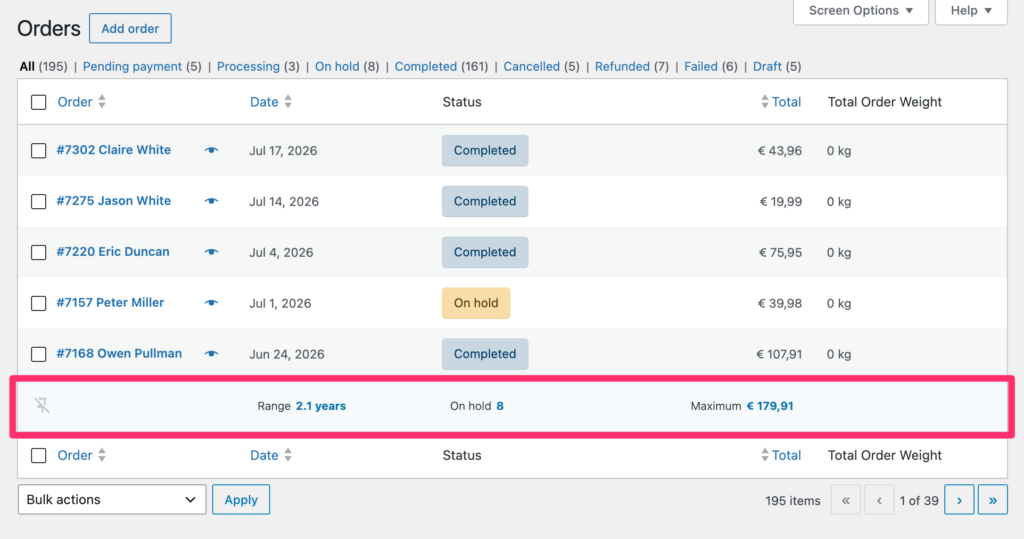
The new Metrics row sits in the footer of your list table – totals update as you filter
Metrics become especially useful when combined with filtering. For example, you can filter orders by status, customer, date range, or product, and instantly see the totals for only that selection.
It works the way you already work in WordPress: adjust the list table, narrow down the results, and get the numbers you need right there.
What you can calculate
- Total – Useful for revenue, stock, quantities, points, downloads, and other numeric values.
- Average – Helpful for order values, ratings, durations, and scores.
- Minimum and maximum – Quickly spot the lowest or highest value in a list.
- Count – See how many records match the current view.
If a column contains numbers, Metrics can help you understand that data faster. Enabled by default in Admin Columns 7.1, Metrics is ready to use as soon as you update.
Custom List Tables: Turn a Database Table into a WordPress List Table
This is the feature we are most excited about!
Admin Columns has always helped you manage WordPress or supported plugin data: Posts, Pages, Users, Media, Comments, WooCommerce Orders, Advanced Custom Fields and many other types of content.
With the addition of Custom List Tables any table in your database can be managed within WordPress as if it was a Custom Post Type with an ACF field for every database column.
Think of all the data that a WordPress site can contain, but that has no meaningful way to manage. Wether there are certain plugins tables, CRM tables, custom tables, tables that are fed from an external system: they can all be turned into native WordPress List Screen. And of course it supports our drag & drop editor to manage it and all the features you can expect like Sorting, Filtering, Search, Edit and Export. Even horizontal scrolling and the new feature Metrics are usable.
You might have a ton of questions on how that would work, how to get started and how we keep you from accidentally delete yourself from the wp_users table. We wrote an article covering just that and more:
Example: Managing Hotel Bookings
Imagine you are running a hotel booking system that stores its data in custom database tables. Each booking contains information such as the guest, room, check-in and check-out dates, booking status, payment status, and total amount paid.
Traditionally, managing this data inside WordPress would require a custom-built admin screen or a completely separate application. While the data exists in your database, it is often difficult to search, filter, edit, and report on in a consistent way.
With Custom List Tables, you can turn these booking records into a fully functional WordPress overview. Guest and room relationships can be displayed as readable values, bookings can be filtered by status or date, and important information such as revenue, occupancy, and booking activity becomes much easier to monitor.
The result is a familiar Admin Columns experience applied to your own data. Instead of building and maintaining a custom management interface, you can focus on the workflow itself while still benefiting from Sorting, Filtering, Export, Editing, Conditional Formatting, and Metrics.
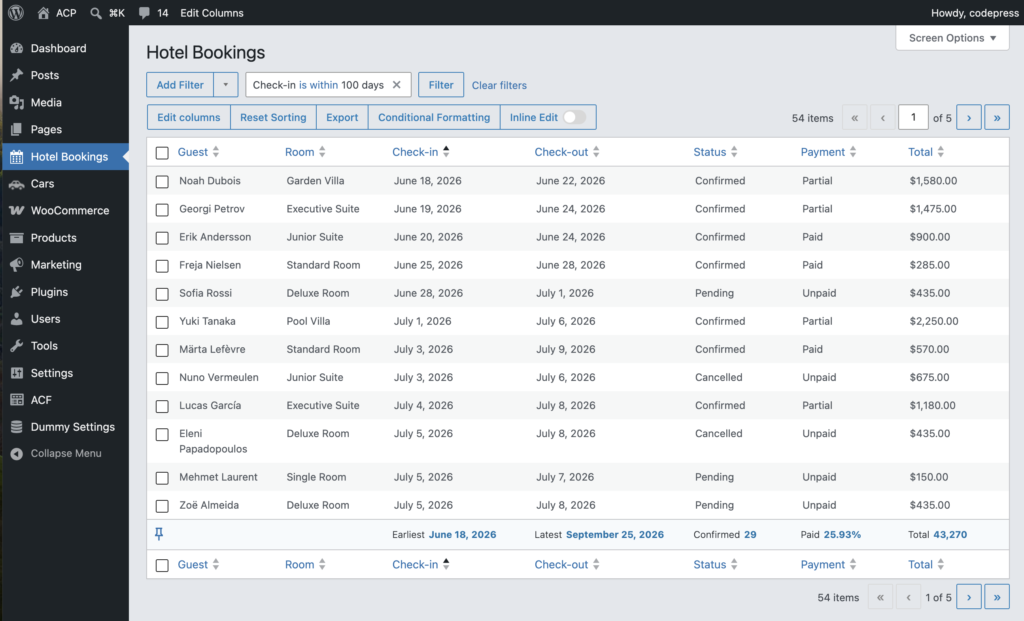
We made it easy to get started
We offer four resources to help you, each from a different perspective:
- Overview Article: Explains what Custom List Tables are, why they exist, and includes a few technical examples.
- Documentation: Technical reference covering the API, concepts, and implementation details.
- Cookbook: A collection of practical recipes demonstrating nearly every configuration and common use case.
- Hotel Bookings example: As demonstrated in this article. We have created a complete and documented implementation that shows how to build a real-world Custom List Table from start to finish
Smaller Improvements You Will Notice Every Day
Admin Columns 7.1 also includes a range of improvements that make daily workflows smoother.
- Export to JSON and Excel – alongside CSV. Hand a client a clean spreadsheet, or pipe structured JSON straight into another tool.
- Sticky headers and columns – with smoother horizontal scrolling and smarter automatic column widths. When you’re working a wide table, your headings and key column stay put instead of scrolling out of view.
- A refreshed Pro interface compatible with WordPress 7 – smart filtering, conditional formatting, buttons, and modals all redesigned to feel native in the new WordPress design.
- Multisite: time-period filtering on Post Count – last week, month, quarter, year, or a custom range.
Closing Thoughts
Admin Columns started as a way to customize existing list tables. Over time, it has become something bigger: a toolkit for managing and understanding the data inside WordPress.
With Metrics and Custom List Tables, WordPress becomes more than a content management system. It becomes a reporting tool, an operations dashboard, and a management interface for your own data.
We cannot wait to see what you build with it!
Try the live demo to explore a fully loaded WordPress admin, no install required.
See pricing: Admin Columns Pro is very affordable and has a 30-day money-back guarantee, no questions asked.
Read the full changelog to see every feature, fix and improvement in 7.1, for when you want all the details.
Already running Admin Columns Pro? Update to the latest version to get Metrics and Custom List Tables on every list table you manage.